
Have you ever had a private tool — an admin panel, a database console, a staging site — that you needed to share with exactly one trusted person, but that also had to stay invisible to everyone else on the internet?
Most teams solve this with VPNs (heavy), htpasswd files (shared passwords, hard to rotate), or by hoping nobody finds the URL (hope is not a security policy).
KMCQ GmbH URL Gate Security Checkpoint is a small, self-hosted app that solves it differently: it puts a simple, verifiable gate in front of any URL. Anyone who wants in must claim a one-time code that is emailed to the account holder you designate — and that proof grants a short, server-side pass to the real destination.
This post walks through what the app does, then gives you a step-by-step guide to installing it, configuring it, gating your first URL, and running it in production.
What KMCQ GmbH URL Gate Security Checkpoint does
At a glance:
No shared passwords, no VPN required, no permanent open door. Each access is credentialled to a real inbox, rate-limited, and temporary.
How the gate works in 30 seconds
The real path is never directly usable — visiting it without a fresh, valid gate returns 403 Forbidden. Because the gate lives on the server (in a database session), it can't be tricked with a bookmarked URL or a crafted cookie.
What's under the hood:
● Built for people who run their own servers:
● Next.js 16 (App Router) + TypeScript — modern, typed, maintainable
● MySQL — stores users, URL rules, one-time codes, sessions, and rate limits
● bcrypt password hashing (verified against existing PHP $2y$ hashes)
● HMAC-SHA256 code hashing with constant-time comparison
● CSRF protection + strict Content-Security-Policy on every request
● nodemailer SMTP delivery (or a log-file mode for local testing)
The full technical reference lives in the security-and-architecture guide.
Step-by-step: install and gate your first URL
Full details in the Installation guide.
1. Prerequisites
● Node.js 20+
● MySQL with a database and user the app can use
● npm
2. Install and migrate
Go to /login. The seeded account is:
● Username: admin_security
● Password: pass_admin_security7777
You'll be emailed an 8-character code (or you can read it from storage/mail.log while running with the default MAIL_MODE=log). Enter it to reach /settings. Change the admin password immediately.
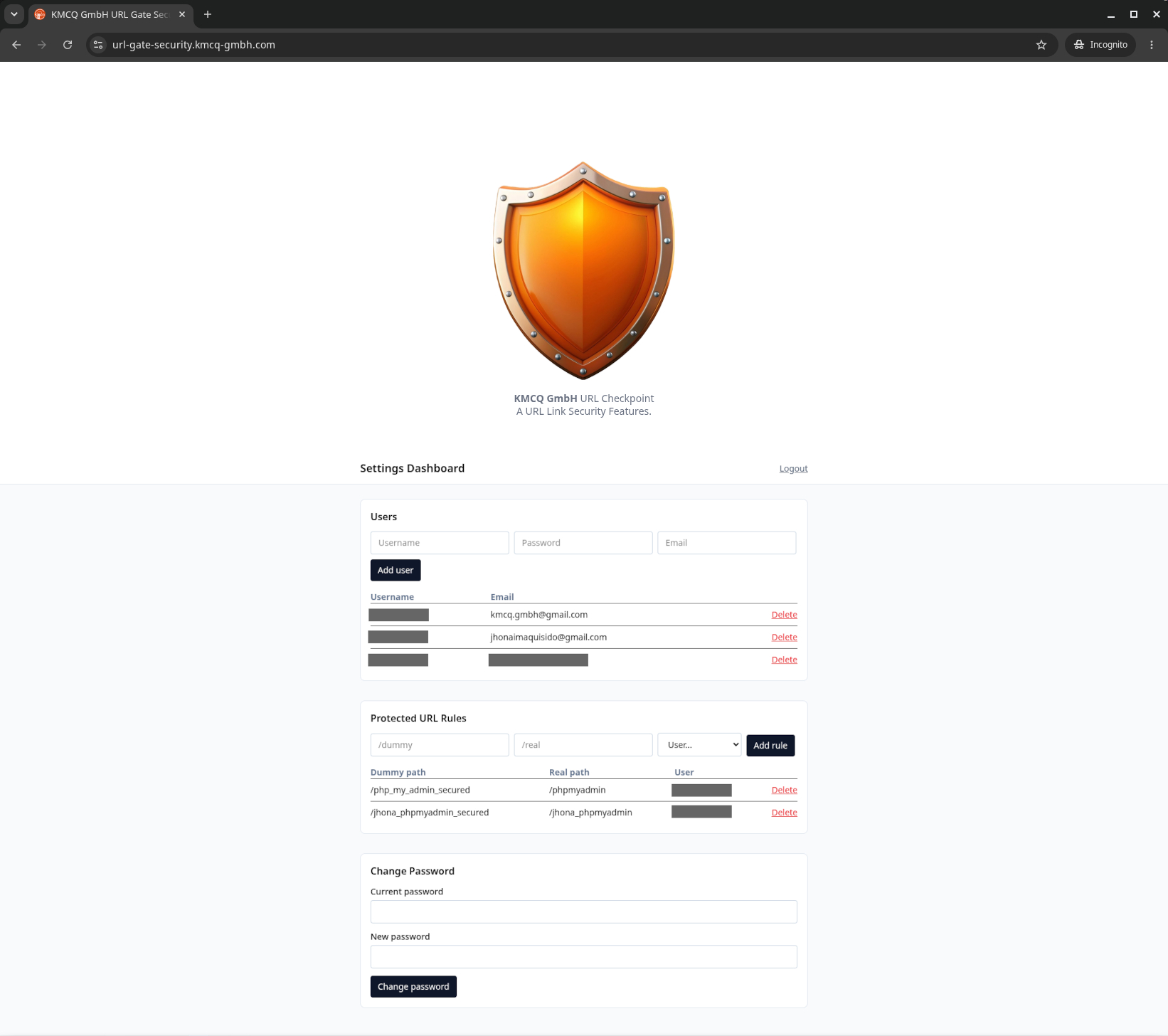
5. Add a user
In the Users section, add the person who will receive verification codes (username, a strong password, and their email address).
6. Add a URL rule
In the Protected URL Rules section:
● Dummy path — the public gate, e.g. /private-folder
● Real path — the protected destination, e.g. /administrators
● User — the account whose email receives codes
The app rejects paths that collide with its own routes (/login, /settings, etc.) and paths already used by another rule.
7. Try the flow
● Visit /private-folder → a "Restricted Area" page appears.
● Click Send me a code → the assigned user receives an email.
● Enter the code → you're granted a 10-minute gate and redirected to /administrators.
● Visit /administrators directly (no code) → 403 Forbidden.
Running it in production
Production is nearly the same as development, with a few important switches. The short version:
Two production patterns worth knowing:
1. Reverse proxying. If a gated URL should hand visitors to another app on the same server (for example, phpMyAdmin on a different port), set GATE_PROXY_TARGET=http://127.0.0.1:3003. Once the gate passes, the app proxies the request to that backend — so the real path becomes a front door to your phpMyAdmin (or anything else).
2. IP restrictions. Set ALLOWED_IPS to a comma-separated list to restrict the entire service to specific client IPs. Requests from other IPs get an immediate 403 — the gate never even runs.
Complete instructions, including a HAProxy/CyberPanel reverse-proxy example, are in the Production deployment guide.
Good to know (honest limitations)
Open-source products are only trustworthy with their trade-offs stated plainly:
● One inviting /one private URL rule per visitor flow. If two projects need two gates, create two rules with distinct dummy/real paths.
● Gates and emails are scoped per rule; an admin session does not bypass a gate.
● Codes expire after 10 minutes, are single-use, and attempts are capped at 5.
● Code sending is rate-limited (3 per 10 minutes per rule).
The detailed security model and known limitations are documented in the Security & architecture reference.
Where to go next
● Installation & configuration guide
● Usage guide
● Production deployment guide
● Security & architecture reference
● Development & testing guide
If you're an admin looking to lock down a single sensitive URL with minimal friction and real accountability, KMCQ GmbH URL Gate Security Checkpoint is a focused, auditable answer — no VPN, no shared passwords, just proof of access that expires.
Most teams solve this with VPNs (heavy), htpasswd files (shared passwords, hard to rotate), or by hoping nobody finds the URL (hope is not a security policy).
KMCQ GmbH URL Gate Security Checkpoint is a small, self-hosted app that solves it differently: it puts a simple, verifiable gate in front of any URL. Anyone who wants in must claim a one-time code that is emailed to the account holder you designate — and that proof grants a short, server-side pass to the real destination.
This post walks through what the app does, then gives you a step-by-step guide to installing it, configuring it, gating your first URL, and running it in production.
What KMCQ GmbH URL Gate Security Checkpoint does
At a glance:
| Feature | What it means for you. |
|---|---|
| URL gating | A "dummy" public path sits in front of a "real" protected path. |
| Email verification | Access requires an 8-character, one-time code sent to email. |
| Time-limited passes | A valid gate lasts 10 minutes, stored server-side. |
| Admin dashboard | Manage users and dummy → real URL rules from a web UI. |
| Reverse proxying | After verification, the app can proxy to a backend (e.g. phpMyAdmin) |
| IP restrictions | Optionally limit the whole service to known IPs |
No shared passwords, no VPN required, no permanent open door. Each access is credentialled to a real inbox, rate-limited, and temporary.
How the gate works in 30 seconds
Visitor clicks a protected link
        │
        ▼
   /private-folder        ← the "dummy" path (public, safe)
        │
        ▼
 "Send me a code"  →  email lands in the assigned user's inbox
        │
        ▼
  Enter the 8-character code  (one-time, 10-minute expiry)
        │
        ▼
  Gate granted (server-side)  →  redirected to the real path
        │
        ▼
        /administrators        ← the "real" protected path
The real path is never directly usable — visiting it without a fresh, valid gate returns 403 Forbidden. Because the gate lives on the server (in a database session), it can't be tricked with a bookmarked URL or a crafted cookie.
What's under the hood:
● Built for people who run their own servers:
● Next.js 16 (App Router) + TypeScript — modern, typed, maintainable
● MySQL — stores users, URL rules, one-time codes, sessions, and rate limits
● bcrypt password hashing (verified against existing PHP $2y$ hashes)
● HMAC-SHA256 code hashing with constant-time comparison
● CSRF protection + strict Content-Security-Policy on every request
● nodemailer SMTP delivery (or a log-file mode for local testing)
The full technical reference lives in the security-and-architecture guide.
Step-by-step: install and gate your first URL
Full details in the Installation guide.
1. Prerequisites
● Node.js 20+
● MySQL with a database and user the app can use
● npm
2. Install and migrate
git clone https://github.com/michael-quisido/authoritativeserv.git
cd authoritativeserv
npm install
npm run migrate     # creates the sessions table
npm run devhttp://localhost:3000Go to /login. The seeded account is:
● Username: admin_security
● Password: pass_admin_security7777
You'll be emailed an 8-character code (or you can read it from storage/mail.log while running with the default MAIL_MODE=log). Enter it to reach /settings. Change the admin password immediately.
5. Add a user
In the Users section, add the person who will receive verification codes (username, a strong password, and their email address).
6. Add a URL rule
In the Protected URL Rules section:
● Dummy path — the public gate, e.g. /private-folder
● Real path — the protected destination, e.g. /administrators
● User — the account whose email receives codes
The app rejects paths that collide with its own routes (/login, /settings, etc.) and paths already used by another rule.
7. Try the flow
● Visit /private-folder → a "Restricted Area" page appears.
● Click Send me a code → the assigned user receives an email.
● Enter the code → you're granted a 10-minute gate and redirected to /administrators.
● Visit /administrators directly (no code) → 403 Forbidden.
Running it in production
Production is nearly the same as development, with a few important switches. The short version:
npm run build
npm start # served on http://localhost:3000 by defaultTwo production patterns worth knowing:
1. Reverse proxying. If a gated URL should hand visitors to another app on the same server (for example, phpMyAdmin on a different port), set GATE_PROXY_TARGET=http://127.0.0.1:3003. Once the gate passes, the app proxies the request to that backend — so the real path becomes a front door to your phpMyAdmin (or anything else).
2. IP restrictions. Set ALLOWED_IPS to a comma-separated list to restrict the entire service to specific client IPs. Requests from other IPs get an immediate 403 — the gate never even runs.
Complete instructions, including a HAProxy/CyberPanel reverse-proxy example, are in the Production deployment guide.
Good to know (honest limitations)
Open-source products are only trustworthy with their trade-offs stated plainly:
● One inviting /one private URL rule per visitor flow. If two projects need two gates, create two rules with distinct dummy/real paths.
● Gates and emails are scoped per rule; an admin session does not bypass a gate.
● Codes expire after 10 minutes, are single-use, and attempts are capped at 5.
● Code sending is rate-limited (3 per 10 minutes per rule).
The detailed security model and known limitations are documented in the Security & architecture reference.
Where to go next
● Installation & configuration guide
● Usage guide
● Production deployment guide
● Security & architecture reference
● Development & testing guide
If you're an admin looking to lock down a single sensitive URL with minimal friction and real accountability, KMCQ GmbH URL Gate Security Checkpoint is a focused, auditable answer — no VPN, no shared passwords, just proof of access that expires.